
Ranked Among Australia’s Top 20 Corporate Training Providers (2026): View Courses

Author: webplanners

Manage difficult situations with CTO Training

Strategies to Handle Difficult People and Situations

By: Corporate Training Options, Australia

Learning the strategies to handle difficult people and situations, and resolve them to everyone’s satisfaction, is an important life skill.  

“When dealing with people, remember you are not dealing with creatures of logic, but with creatures of emotion; creatures bristling with prejudice, and motivated by pride and vanity.”

Dale Carnegie

At one time or another we’ve all experienced difficult people and situations.  It could have been with a customer, colleague, peer, partner or stranger. 

When you master the strategies to handle difficult people, it will help you to better manage your relationships, your career, your workplace, and your organisation.

These skills will help both you and your coworkers, as you learn to:

  • Listen effectively and develop your tolerance and problem-solving skills 
  • Understand what the upset person’s motives are for being difficult
  • Determine if the person complaining is being difficult at all
  • Develop empathy for their situation and understand where you fit into the problem
  • Learn how you can resolve difficult situations, so everyone benefits

In this article we’re sharing 5 Master Strategies to Handling Difficult People & Situations, to get you underway.

To discover more about the Handling Difficult People & Situations course from Corporate Training Options, you can view the course outline here.

5 Master Strategies to Handle Difficult People & Situations

Strategy 1: Understand that everyone is different

All of us are individuals.  We all have our own thoughts and actions and our own way of understanding and processing events.  Your team, your customers and everyone you come into contact with is a living, breathing human being, with different backgrounds, different upbringings and different life experiences. 

Dealing with difficult people and situations is about focusing on:

  1. Listening to people to determine if a real problem does exist 
  2. Processing what people are saying to you
  3. Understanding what meaning and energy you give that person, the situation and what they have told you
  4. Discovering what type of personality that person has
  5. Acknowledging what type of person you are
  6. Looking deeper, so you can appreciate people’s body language, speech, attitude and other behaviours. 
  7. Deciding what action you will take

The moment you start listening, and understanding the different motivations and personality types of people around you, combined with the meaning you give it, is the moment you can begin to understand difficult people and resolve difficult situations. 

Strategy 2: Look inwards, to learn if you contribute to difficult situations

We all need to understand that we cannot control other people’s thoughts and actions, just as they cannot control ours. 

Some people get agitated quickly and easily, and some do not get agitated at all, no matter what unpleasantness may come their way.

So it’s time for a self-analysis check! 

Start by identifying where you can improve. Perhaps you’re too quick to judge, or maybe you have trouble communicating to others – often coming off as rude. 

Other times you may be just having a bad day, which makes it easy to take it out on someone else. It doesn’t make it right, but it’s  a reality.

By doing a self-analysis, you’ll be able to identify traits and characteristics about yourself that you can improve on, if you decide you need to.  And by identifying areas that need improvement in your attitude, persona and character, you’re already halfway there in developing and putting new practices into action. 

Another way you can do a self-analysis check is – every time you have a demanding customer or situation, once it is over, score yourself out of ten about what you did well and in which areas you could have done better.

Strategy 3: Listen & Assess – what are the needs of the other person?

We all know it is much easier to retreat from unwanted conversations and conflict.  However, it’s important to stand your ground, be polite, and listen, listen, listen. 

Think: What does this person want or need, and what are they actually upset about?

For example, if you have a difficult customer complaint, try to empathise with them, identify their main problem, take your time, and listen. 

Master strategy Three to Handling Difficult People & Situations is to always focus on listening. There’s a reason we have two ears and one mouth. 

Practice training your mind, attitude and speech to be ‘judgment-free’, so when people are upset, you’re cool, calm, collected and helpful.

In many cases, much of the conflict a customer or person may have towards you, isn’t directed or about you at all. The person who is upset may be just having a bad day, or have other problems in life, and you’re the unlucky one they decide to take it out on.

Strategy 4: Use the right words, voice and attitude to calm people and resolve the situation.

We all under-estimate the power of words and how we use them. When flung into situations and disagreements it’s easy to get caught off guard and respond in an angry and impolite manner. But remember – You’re bigger than that. 

We’ve all heard the saying ‘You get more with a smile than you do with a frown.’ 

When you need strategies to handle difficult people or situations, this is one you should apply. First, analyse the complaint, the person and the situation. Then, before responding, choose your words carefully, using a soft courteous voice, and a calm and helpful attitude and manner.  You’re guaranteed to find a positive result for everyone involved. 

By thinking clearly and choosing your words carefully, you’re less likely to crack under pressure, become negatively influenced or leave serious issues unaddressed altogether. 

Strategy 5: Think in terms of solutions and service, not problems

You and your mind are powerful beyond measure.  What you think about, you bring about. Your mind can take you to the depths of despair, or to heights of success you’ve only imagined. It all depends on how you use it.

Resolving difficult situations is all about focusing on solutions, being true to your word and yourself, and being respectful, irrespective of who is right or wrong.

The last of the Master strategies to Handling Difficult People & Situations is this.

Every single human being wants to feel valued, wants to be heard and needs to be understood.  By focusing on solutions and understanding, you are in the service business.  You will find positive outcomes, resulting in less anger and better resolutions for everyone involved.

In Summary

All of us face difficult people and situations, both in and outside of work. It’s inevitable.  However putting your energy into resolving and handling difficult people and situations, comes down to your attitude, your people skills and how you feel, think and act, that will result in a positive outcome for all. 

So take the initiative – don’t give away your power, or let difficult interactions affect your mind or performance in your workplace or relationships.

Over to You.

Think about your experiences with handling difficult people & situations

Dealing with difficult people and situations is never easy. However, there are some great resources, and particular skills you can learn and develop, to help you resolve these conflicts.

One great resource that many other organisations have used before is the Handling Difficult People & Situations course from CTO. 

This course is perfect if you who want to equip yourself with the necessary skills to manage difficult people and resolve difficult situations effectively and professionally.

Upon the completion of the )Handling Difficult People & Situations course, you will be able to: 

  • Identify who the problematic people in your life have been in terms of their characteristics and the rewards they get for behaving as they do.
  • Examine how your personal beliefs and values play into the way you deal with difficult people.
  • Identify the ‘sources of power’ difficult people have over you, and learn the degree of difficulty posed by each one.
  • Assess each difficult situation, to enable you to make a good decision about how to handle the situation you face.
  • Learn new tools to help you find the right words
  • You’ll also receive a process model, to guide you through difficult interactions with grace and skill.

To discover more about the Handling Difficult People & Situations course from Corporate Training Options, you can view the course outline here.

Alternatively, please contact us by email at training@cto.com.au, for the latest team member training packages.

The Benefits of the strategies to Handle Difficult People & Situations Training Courses include:

  • We focus your training on the outcomes you require for your team
  • Your training can be provided on the dates which suit you
  • Training can be provided for a number of trainees for the same rate
  • You can choose topics from different courses, and your trainer will tailor your sessions around these requirements
  • Our trainers are available to present your training within two weeks of your booking date.

 Why Choose Corporate Training Options?

  • Your Trainers are certified experts who are real-world practitioners
  • The courses are interactive, well organised and fun – making it easier for you to learn
  • Small classes mean each trainee will receive individual attention and can be confident about the skills gained
  • Our complimentary trainer consultation prior to your training ensures your objectives will be met
  • CTO is a Business Excellence Award winning company

About Corporate Training Options

Corporate Training Options is Australia’s leading professional development training company.  Incorporated in 1992, we have facilitated & run over 100,000 training courses across Australia and in numerous international locations.

CTO training provides a cost-effective way of ensuring you and your staff are presenting your best image to the world.  CTO Professional Development and Computer Training courses are customised to meet your requirements, and your training is provided on-site, on dates which suit you.

The courses will assist you to develop strong skills in: 

  • Customer Service 
  • Leadership & Management
  • Strategic Business Planning
  • Project Management
  • Marketing & Sales
  • Business Administration
  • Finance & Accounting
  • People & Culture 
  • Computer Training
  • Personal Development

Each CTO trainer has specific areas of expertise. This enables them to provide invaluableassistance to organisations like yours, seeking to maximise your investment in your teams and your technology.

So if you’re ready to upgrade your skills, or you wish to tackle some new challenges, contact Corporate Training Options today. We’ll meet your specific needs with a tailored training course to suit your requirements.

We look forward to working with you, to build your confidence, improve your efficiency and maximise your potential.

Rosy King

Corporate Training Options

Professional Training  –  Exceptional Results

training@cto.com.au

cto.com.au

Deliver Winning Projects with Microsoft Project 2016

By: Corporate Training Options, Australia


Many organisations use Microsoft Project for their Project management teams. Developing practical skills with Microsoft Project training will allow you to easily create new projects, manage multiple tasks and resources, and be able to schedule, track and manage costs and budgets for your projects.

If you and your team are becoming overrun by various projects, or need solutions to increase efficiency, Microsoft Project is without a doubt a must-have for your staff and organisation. 

At its core, Microsoft Project is innovative project management software. Its power is in streamlining time consuming tasks involved with any project.  

From the conception of an idea to the final creation and action, Microsoft Project allows you to follow a structured outline of your project, step by step. And with its highly effective collaborative interface, all updates from each team member come together harmoniously. 

If you’re looking for real-world practical skills and training to take your project management and team productivity to the next level, the Corporate Training Options Microsoft Project Introduction Course will benefit you. 

Some of the time consuming tasks Microsoft Project can reduce in your organisation:

  • Entering tasks into a project file
  • Creating and monitoring team member involvement and specific tasks for each project
  • Printing effective project information
  • Managing a budget
  • Adding resources, including labour, materials and equipment to your projects
  • Creating schedules for your tasks or projects

Microsoft Project is an extremely flexible, powerful, all-inclusive solution for the daily tasks your project management involves. From the progression of specific functions to team members hours, supplier costs and project budgets, there’s plenty of benefits to using Microsoft Project for you, your team and your organisation.

Tips to work more successfully with Microsoft Project

Simplify Project Planning

The planning and steps to be taken with any new project are undoubtedly most important. Sometimes it can be difficult to ensure everyone is clear on the plan and the steps required for each schedule or project your team has on the go.

With Microsoft Project you can simplify project planning for you and your team, and you can adjust accordingly as your project evolves. 

Information required for your projects can be laid out in a simple view, so your project planning falls into place with ease, allowing you to:

  • Easily assign tasks to individual team members and teams
  • Plan project completion dates
  • Schedule each team members involvement and contribution to each project 
  • Ensure collaborators are on the same page for your project plan, goals and outcomes.

Plus, when team members can view which tasks need to be executed, when and by whom, motivation and communication in your team, and productivity, increase dramatically

Update Critical Changes and add Milestones with a click of your mouse 

When working on both large and small-scale projects, critical changes, milestones and updates can occur during any stage. 

Microsoft Project 2016 keeps all your team members up to date by setting any newly added constraints, deadlines, over-allocated resources, change of schedule and other data and tasks in a single sheet view, or Gantt chart.

Bonus Tip: A Gantt chart is an excellent tool that equips you with the ability to oversee each element of the project and actively track its progress, such as critical changes and milestones. This is must-have information for project managers and their teams. 

Plus, by being able to update critical changes and add milestones when required, communication is vastly improved for everyone involved, which keeps your project on track and reduces confusion. 

Track Costs to avoid expenses overrun  

Undoubtedly, all organisations strive for projects that are completed on time and within budget.

Microsoft Project 2016 allows your team to assign resource project costs collaboratively to create accurate cash flow projection. By creating sheet files and Gantt charts, newly imported data and expenses can be easily updated and accessed by those allocated to the data. 

Microsoft Project allows for a high-level estimate of resources required for a particular project. Essentially, this is an excellent tool to help you stay on budget and identify cost or resource blowouts. 

Monitor Individual Team Member Progress 

Another powerful feature and benefit of Microsoft Project 2016 is the team planner tool. This feature allows you to have access to an overview of the project in progress, while monitoring how each team member is progressing with his or her tasks. 

With the added team planner tool, you’re able to keep up with the work status of your team members and oversee their percentage of completion. 

Other key features and benefits of the Microsoft Project team planner tool are:

  • Increased team efficiency
  • Each team member has accountability 
  • You can easily update and reassign tasks to specific team members if required 
  • Ability to amend your project in real time for everyone to see, which keeps your project on track 

These functions can be carried out in one core collaborative worksheet within the team planner tab so everyone can access, view and adjust current or reassigned tasks.  

Manage Multiple Projects with ease with Microsoft Project’s Priority Review Tab

Are you managing more than one project in your organisation? Most of us are, and subject to your current project management processes, having multiple projects on the go can be stressful. For small organisations, or others beginning to operate on a larger scale, it’s essential to ensure that each project is scheduled, managed and prioritised accordingly. 

Microsoft Project’s priority review tab can help you track, monitor and maintain the overall progress of multiple projects at any one time. 

Using the priority review tab, you’re able to see the top-to-bottom prioritisation scores of each project, including overall budget and constraints, and other critical areas of your projects.

In Summary

We hope you’ve found these Microsoft Project tips beneficial. Of course, this is merely a snapshot of how Microsoft Project training can benefit you, your team and your organisation.

It’s also why we’re seeing more and more organisations coming to Corporate Training Options for Microsoft Project training

Project Managers realise it is a must-have for their organisation’s productivity, if they are to manage their teams, expenses and their projects, so they deliver a positive return on investment in time and money.

Upon the completion of the CTO Introduction to Microsoft Project course, you will be able to: 

  • Start Microsoft Project and identify how it works
  • Explain some of the key concepts associated with project management
  • Enter tasks into a project file
  • Create relationships between tasks in a project
  • Understand and use resource assignment calculations
  • Allocate resources to tasks using a number of different methods
  • Use various techniques for levelling over allocation of resources
  • Assign material resources in a project
  • Track costs within a project
  • Apply constraints and deadlines to tasks in a project
  • Monitor the progress of a project
  • Print various aspects of your projects

To discover more about the Microsoft Project Introduction course at Corporate Training Options, please view the course outline here.

Alternatively, please contact us by email at training@cto.com.au for the latest Microsoft Project training packages.

Like these Strategies on Microsoft Projects 2016? 

Please feel to share them with people you know will benefit from them.

The Benefits of completing your Microsoft Project training with CTO include:

  • We focus your training on the outcomes you require for your team
  • Your training is presented on the dates which suit you
  • Training can be provided for many trainees for the same daily rate
  • You can choose topics from different course levels, and your trainer will tailor your sessions around these requirements
  • Our facilitators are available to present your training within two weeks of your booking date.

 Why Choose Corporate Training Options ?

  • Your Trainers are certified experts who are also real-world practitioners
  • The courses are interactive, well organised and fun – making it easier for you to learn
  • Small group training sessions mean each trainee will receive individual attention and can be confident about the skills gained
  • Our complimentary trainer consultation prior to your training ensures your objectives will be met
  • CTO is a Business Excellence Award winning company

__________________________________________________

About Corporate Training Options

Corporate Training Options is Australia’s leading professional development training company, incorporated in 1992. In that time, CTO has facilitated  thousands of business training courses Australia wide.

CTO training provides a cost-effective way of ensuring you and your staff are presenting your best image to the world.   Your Professional Development and IT Training courses are customised to meet your requirements, and your training is provided on-site, on dates, which suit you.

The courses will assist you to develop strong skills in: 

  • Customer Service 
  • Leadership & Management
  • Strategic Business Planning
  • Project Management
  • Marketing & Sales
  • Business Administration
  • Finance & Accounting
  • People & Culture 
  • Computer Training
  • Personal Development

Each CTO trainer has specific areas of expertise. This enables them to provide invaluable assistance to organisations like yours, seeking to maximise your investment in your teams and your technology.

So if you’re ready to upgrade your skills, or you wish to tackle some new challenges, contact Corporate Training Options today. We’ll meet your specific needs with a tailored training course to suit your requirements.

We look forward to working with you, to build your confidence, improve your efficiency and maximise your potential.

Rosy King

Corporate Training Options

Professional Training  –  Exceptional Results

training@cto.com.au

cto.com.au

Microsoft Excel Intermediate level Training from CTO

5 Tips to Improve your Skills in Microsoft Excel

By: Corporate Training Options, Australia

Want to improve your skills in Microsoft Excel?  Here are some features and concepts you can learn which will evolve your knowledge and take your Excel skills to the next level.  

 A lot of these features are designed to be user friendly and were created to let the program do the heavy lifting for you. So, with that said let’s jump right in. 

One way to improve your skills in Microsoft Excel is to use and understand Formulas.   Excel Formulas allow you to quickly perform mathematical equations within a worksheet.

They are used to provide answers to a mathematical question.

For example:

  • The cell A1 contains the number – 3 
  • Cell B1 contains the number – 6
  • In the cell A2, we have created the simple formula:  =A1*B1
  • This formula provides the answer to simple equation – what is 3 x 6
  • The answer equals – 18, and will be shown when we press the “Enter” key

This simple example is an introduction to the formulas Excel can perform. Many complex mathematical equations using a variety of different values can be created using formulas in Excel. So, it’s a good investment of your time to learn the formulas in Excel which are there to do the work for you. 

Excel Functions contain formulas and can be used instead of a formula that would be too long to enter manually (say you wanted to add 1000 cells together). 

You can think of a function as something that performs a formula for you. They can simplify the work done by a formula even further and are a powerful tool that should be harnessed by  Excel users. 

Advanced users can even begin to create their own functions using VBA (Visual Basic for Applications) which is a programming language used in Microsoft Office Applications.

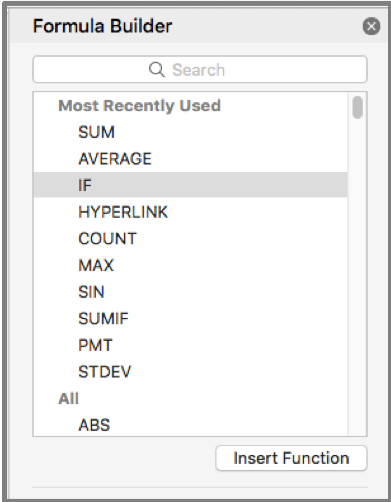
There are many different built-in functions in Excel, but the most basic ones allow you to add numbers, calculate averages and perform logical tests for a True or False value (Boolean value). 


Layout and presentation are an important aspect of working in Excel. When your workbooks are going to be used and shared with other people it is essential to put some weight on ‘readability’, which is a crucial part of any form of visual communication. 

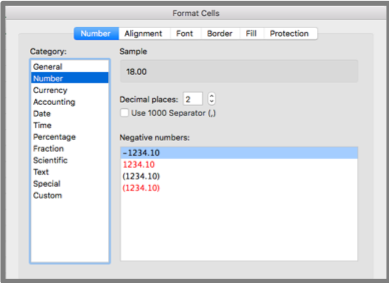
Excel gives its users many tools which they can use to format data and present it clearly in nearly any way imaginable. To see some of the formatting available in Excel, highlight a cell or a grouping of cells in a worksheet, then right click to select ‘Format Cells’. 

From here a popup will appear with many different menus and settings. You can spend some time going over these options and seeing how they affect the text in the cells.

Among other things, you can use these options to quickly convert a series of numbers to different currency, convert different time and date formats, turn whole numbers into fractions, percentages and vice versa. Imagine having to manually insert a ‘$’ symbol into 30 different cells or having to convert the date 3/07/2019 to Wednesday, 3 July 2019 and repeat it for 50 other dates. 

Now all of this repetitive formatting work can be done with a few clicks and keystrokes. 

From wrapping text to adding borders, colours and patterns to cells, do it all easily from within Excel and produce worksheets exactly how you want them to look with maximum readability. 

To improve your skills in Microsoft Excel, you should take advantage of the quick analysis tools. This feature of Excel can help you quickly analyse sets of data and produce either the result of an equation or a visual representation of the data in the form of a chart, table or one of the many other options available. 

To use the Quick Analysis feature:

  • Highlight a range of cells with data in them
  • After you have made the selection, a button will appear in the bottom right of the selection
  • Click on this button to access the options you can use to resolve or compare your data 
  • From here you can create charts or tables and calculate totals, among other things

This feature is useful for quickly producing visual representations of your spreadsheet data and can help you understand the numbers at a glance. 

Note: This feature is not currently present in the Mac version of Excel 2016.

While workbooks are normally viewed in a digital workspace, there may be times when you need to print out the work you’ve done in Excel. 

To the novice this can be a nightmare; most users are not aware of the level of control they have over their printing and page layout options.

Select which worksheets out of the workbook you wish to print. Sometimes everything in the file is not relevant to what you want to print out. 

You can select active sheets by clicking and highlighting the desired sheets while holding the ‘Ctrl’ button (Command on Mac). 

Then in the print menu be sure to set the “print” option to “selection”. 

You can set a static printing parameter by using the Print Area option. This allows you to work within a defined printing parameter within a specified worksheet. 

Margins will also impact your printable area and can be set precisely how you want them. Either use the pre-sets available or dive in and set your own.  

Consider whether you want to print your work in portrait or landscape mode, keeping in mind how much relevant information you will be able to fit on the page with either option. 

Portrait mode will allow you to include more rows on your page, whereas landscape will give you more column space to work with. You can change the orientation under the “Page Layout” tab. 

Scaling options allow you to fit elements to the page, however, it can be at the cost of readability of those elements. There’s no point having everything on the one page if your printout is then so small that nobody can read it. So, use these tools with that in mind. Ensuring your data is readable is our primary goal. 

Print Titles can be used to keep the same headings present at the beginning of every new page. This makes your printed workbook much easier to read if the same table spans over multiple pages. This option is also found under the “Page Layout” tab. 

Once you have everything set out the way you want, you’ll be able to hit ‘print’ with confidence. 

We have only touched on a few of the features present in Excel. It is a powerful program, and anyone with the skills to wield it will be highly valued in any workplace environment. 


Excel Training Courses to fit your requirements

If you are looking to improve your skills in Microsoft Excel and boost your Excel know how, then our Intermediate Excel course is perfect for you. 

To gain an understanding of the topics you can cover in the course, click to see the course outline for our intermediate Excel course.

Becoming familiar with and mastering these skills will save time and increase productivity. Investing in the performance of your workforce can save hours of wasted time and frustration down the track. 

These skills are only a click away. 

Upon completion of the Corporate Training Options Intermediate Excel course you will be able to:

  • use filling techniques 
  • use a range of techniques to work with worksheets 
  • apply a variety of page setup techniques 
  • apply borders to cells and ranges in a worksheet 
  • use common worksheet functions 
  • create more complex formulas and functions 
  • create and use defined names in a workbook 
  • apply a range of number formatting techniques to worksheet cells 
  • apply conditional formatting to ranges in a worksheet 
  • use goal seeking to determine the values required to reach a desired result 
  • understand and use Excel’s Quick Analysis tools 
  • create and work with tables 
  • use a range of elements and features to enhance charts
  • select and change the format of objects in a chart

You can also take advantage of our courses for beginner and advanced users of Excel.  We also have courses available for you in Microsoft Excel Functions and VBA for Excel

Enrol online today

Alternatively, for further information, please email us at:  training@cto.com.au.


About Corporate Training Options

Corporate Training Options (CTO) provides you with training in essential business skills, via onsite and online business and professional development courses.

Your courses are customised to meet your requirements and provide a cost-effective way of ensuring you and your team are presenting your best image to the world. 

For more information on the range of Business Training Courses available, please visit the CTO website – cto.com.au

We look forward to working with you, to build your confidence, improve your efficiency and maximise your potential.

Rosy King

Corporate Training Options

Professional Training  –  Exceptional Results

training@cto.com.au

cto.com.au

Collaborate with Microsoft Office 365

Work Faster & Smarter with these Office 365 Success Tips

By: Corporate Training Options, Australia

7 Tips for Success Using Microsoft Office 365

If you and your organisation have embraced Cloud applications, Microsoft Office 365 may be an untapped mine of productive potential. 

Programs you may already be accustomed to – such as Word, Excel, PowerPoint and Outlook – can be conveniently installed on different smart devices as well as computers, but that’s not where Office 365’s utility ends. 

Here are seven tips you can use to work faster and smarter, using Microsoft Office 365.

Up your Email Game

Everyday communicating can be fraught with hazards – from sifting through mass emails, the lingering threat of malicious viruses, and of course, human error. Office 365 helps you engage your email efficiently and proficiently.

1. Colour Coded Email Security

With Office 365, incoming messages are colour coded so you can make better choices about which to open and which to avoid. 

Suspicious emails – messages that have failed sender authentication or have been flagged as a potential phishing attempt – are red and should be deleted. 

Unknown emails, or “spam,” are yellow, but if mistakenly identified by the Exchange Online program as spam, can be manually unflagged and moved to your inbox.

Green emails are trustedemails that come from a domain Microsoft considers safe. 

Safe emails are grey, They have either been marked as safe by your organisation; were once spam but you’ve moved it to your inbox and unflagged it; or come from a contact on your “safe sender” list.

2. Marie Kondo your Inbox

Be proactive and use the “Clutter” feature to keep your inbox free of spam. Mark unwanted messages as “clutter”, and Office 365 will keep them and less important emails in their own folder. You can read, delete, or otherwise deal with them at another time.

3. Free Yourself from “Reply All” Chains

Nothing clogs up your inbox like a mass email to which a few people hit “reply all” when they respond. With Office 365, you simply go into the message, click the “Home” button, go into the “Delete” group, and happily click “Ignore”. It’s like muting the conversation. 

Office 365 will pull the message stream out of your inbox and flip it into the trash. If you ever need to restore the message, you can find the “More” option and click “Stop ignoring”.

4. Take Back that Email Before it’s Read 

If you’ve accidentally:

  • sent an email before you had finished it, or 
  • sent it to the wrong person, or 
  • hit “Reply All” when you meant to respond only to the sender

You can undo the mistake by opening the sent message in a new window. In the “Move” section, click on the “Actions” button and click “Recall This Message”. 

You can opt to “Delete unread copies of this message” to remove the item from unintended recipient’s inbox. If it’s just a matter of making edits, choose “Delete unread copies and replace with a new message”. 

You can also opt to receive a notification confirming whether your email was successfully recalled or if it was opened before you could recall it. You can’t recall a message that has already been read, and you and the recipient must be on the same Exchange and using Outlook Desktop. 

If you have MailTips implemented in your Office 365, it can warn you of common mistakes, such as forgetting to actually add an attachment, before you hit “send”.

Collaborate More Efficiently and Effectively

Microsoft Office 365 has made it easier to work as a group, streamlining many of the processes that tend to result in lots of back and forth between people working on the same project.

5. Chat with Co-Authors while you’re all on the Same Page

Work as a Team with Office 365
Teamwork with Office 365

Sharing documents, so that people can add their input and make edits, is a great collaborative tool. But wouldn’t it be great if you could chat about changes before making them, or whilemaking them? 

With Office 365, team members can discuss a shared document stored on SharePoint Online or OneDrive for Business, in real time, making the editing process faster and smarter. 

Participants need only click the chat icon at the top right of their screens while they are viewing the shared document and a chat box will pop up.

You can also minimize the chat box if you find it distracting. It will become a chat bar, that changes colour when there is a new message, so you can stay in the loop.

6. Request Input from Others using @Mention  

If you want someone’s input on a work file, you can get their attention promptly with the @Mention function. Open a document in a SharePoint library or OneDrive for Business, and add a new comment. 

When you type “@” and the first few letters of their name (first or last), you’ll see some auto-filled options. Choose the correct person’s name. This will automatically send a notification to their email that they have been mentioned in a comment, along with a link to the document. When they respond, you’ll get a similar notification.

This will only work if you have given this person permission to open the file. If you haven’t already, you will be asked to do so when you use @Mention. 

7. Manage Aspects of your Work and Life

Not only does Office 365 let you sync your Calendars between all your devices, but you can use your browser or online apps to access your Calendars. 

You get instant access to all your calendars – and group calendars if you are in one or more groups.

You can even create special calendars to track Birthdays, Holidays, and “Interesting” events or topics.

For example, if you’re a sports fan, you can create a calendar with all the upcoming sporting events – whether you are playing, attending, or watching.

In Summary

Utilise the power of Microsoft Office 365 for your team

Most of us use less than 20% of the features available in Microsoft Office 365. It’s truly powerful software, which you and your team can use to work smarter and faster. Learning how to use features in Office 365 – including OneDrive, Newsfeeds, email management tools, shared files and @Mention – will allow you to take advantage of the clever design features of Office 365.

Corporate Training Options can assist, with both introduction and advanced training courses in Microsoft Office 365, plus individual courses in software such as Microsoft Yammer, Microsoft Teams and SharePoint.


Need Microsoft Office 365 Training?

Corporate Training Options can train you and your team to take advantage of the awesome tools available for you in Microsoft Office 365. Our Microsoft Office 365 Introduction Course is suitable for staff of all levels, from reception, administration and support staff, through to senior management.

And if you are already competent With Microsoft Office 365, our Microsoft Office 365 Advanced course is perfect for you.

Upon successful completion of the Corporate Training Options Introduction to MS Office 365 course, you’ll be able to: 

  • understand what Office 365 is and how it can be used 
  • understand how to start working with Office 365 
  • create, send and receive emails using Mail 
  • use Calendar to manage meetings, events and appointments 
  • understand and work with People 
  • create and join groups, post and interact with messages, and work with files using Yammer
  • use the Newsfeed
  • access and navigate OneDrive 
  • start working withOffice Online 
  • perform more complex email operations using Mail 
  • configure and personalise Mail settings to suit your needs 

Enrol online or get a quote today, from Corporate Training Options. for your Microsoft Office 365 course.

Alternatively, please contact us by emailing training@cto.com.audirectly.

About Corporate Training Options

Corporate Training Options (CTO) is a Business Training Company, which provides you with training in essential business skills, via onsite and online business and professional development courses.

The courses provide a cost-effective way of ensuring you and your team develop strong skills in:

  • Leadership & Management
  • Strategic Business Planning
  • Project Management
  • Marketing & Sales
  • Customer Service & Relationship Management
  • Business Administration
  • Finance & Accounting
  • People & Culture 
  • Computer Software Training
  • Personal Development

We look forward to working with you, to build your confidence, improve your efficiency and maximise your potential.

For more information on the range of Business Training Courses available, please visit the CTO website – cto.com.au

Rosy King

Corporate Training Options

Professional Training  –  Exceptional Results
training@cto.com.au

cto.au.com

Online Training with CTO

Online Training – Learn the Skills you need to improve your Business

Online Training from CTO provides you with a range of courses you can take anytime, anywhere – to improve your life, your relationships and your business, and have fun doing it!

By: Corporate Training Options, Australia

Online Training with CTO
Learn new skills online – anytime, anywhere

Learning new skills improves our lives, across all areas. As we gain knowledge, we have the ability to earn more and enjoy a more satisfying career.  We become more interesting people, as we make new connections between what we are learning, and the existing knowledge we already have. We improve our quality of life, our relationships, and our business, as we can adapt quickly to change and feel more confident in ourselves and our ability to take on new tasks.

And learning is fun. There are so many exciting courses available, providing us with a way to learn fascinating new skills and talents. It’s also a social activity, with online discussion forums available with our peers and expert instructors, where we can ask questions, reinforce our learning and get feedback.

Why not give it go today?  You can see some of the most popular online Business Training courses here.


“Education is the most powerful weapon which you can use to change the world”  –  Nelson Mandela


What are the benefits of learning new skills?

Learning new skills enhances the quality of our life, providing us with knowledge when we need it and reducing stress.  It breaks us out of our usual patterns and changes our brain chemisty.  

As we learn, our learning speed increases and we gain confidence.  We are more able to tackle new tasks and our mental well being improves as we set new goals and targets. and then reach them.  This sense of achievement is an important part of feeling we are doing well.  Learning new skills also fights boredom and allows us to adapt better to change.

We learn to understand ourselves, our strengths and weaknesses.  To learn the art of life.  And to master the techniques of adjusting and accommodating to changes in our surroundings and life situations.

Why learning is so important for success

Learning new skills is really important for our future success.  It shows we have the drive and commitment to learn and apply new information, ideas and theories, to achieve a variety of tasks and goals.

Knowledge has allowed us to make amazing advances in science and technology.  As they say, knowledge is power and one of the important reasons to learn something new is we gain power when we do.  It makes us far more capable and it helps us get ahead in the workplace and in everyday life.  We can communicate our ideas more clearly, and reason and think for ourselves.

How can online training help us in the workplace?

CTO Online Business Training
CTO Online Business Training – Anytime, Anywhere


Learning new skills fortifies and rounds out the skills we need to excel in the workplace, improve our resumes and move to a better paying or more desired position.  Training allows us to keep on top of our industry and learn new skills that become necessary as technology progresses.

Learning new skills can also help us decide what we want to do with our life and makes us more confident when approaching a new role and interacting with other people.

Online training gives us the opportunity to learn basic business principles.  These days, it’s important that we have an understanding of how the entire organisation operates.  If we’re acquainted with the basic functions of all departments, we can be a better business leader, and a significantly more attractive candidate for new roles.

A willingness to learn is a compelling characteristic when putting ourselves forward for new positions.  We should always be taking steps to improve and gain new skills, stay on top of industry trends, and step outside our comfort zones.

Discover some of the most popular online Business and Professional Development courses here.


How can we learn new skills quickly?

We can learn new skills more quickly by interacting with the available information.  As well as completing an online course, we should also gather information from videos, blogs and podcasts.

Make learning more meaningful by connecting it to our own life and experiences, and seeing how it fits into our personal scheme of things.  Consider how can we put what we have learned into practice and use it to our advantage?  When we can do this, we will grasp new concepts much more quickly.

Learn by doing, and build new habits to enforce our skills. For instance, if we are learning Excel, build spreadsheets and practice with new formulas and functions, which will provide us with the data we need in our business or workplace.  Also, regularly compare our work with that of experts in our field.  We will then notice areas where we can improve.

You can see a sample of the most popular online training Computer Training courses here.

Spend time practicing things we find difficult, until they become easy, because in order to excel in a skill, we need to push ourselves out of our comfort zone.  Over time, we will achieve a higher level of efficiency in this skill.

Why is learning new things good for our brain?

Research suggests that continued cognitive activity has a positive effect on braincells and helps promote mental sharpness.  Learning new skills stimulates neurons in our brains, which forms more neural pathways and allows electrical impulses to travel faster across them.  This helps us learn better, and to learn things more quickly over time.  

Using our brains more allows us to find a way to work through frustrations and achieve competence.  Leaning new business or career skills is important for surviving and thriving in the workplace.  Learning new skills is essential for building the career or business you love.

Why knowledge is important in our life

Lifelong learning is important.  The voluntary decision to enrol in courses and learn new skills keeps us motivated, with the desire for more knowledge and self-improvement.

We need knowledge to be successful in life.  To grow in our careers, gaining as much knowledge as possible is important.  Knowledge allows us to shape our personality, improve our behaviour, deal with people and situations more easily. 

Which skills are important in 2019 and beyond?

Many of the skills we are learning today will be quite different from the skills we will need in as little as a decade.  Technology is changing our world so quickly, that new jobs and business opportunities are arising every day. 

Below are some of the skills which are highly desirable in 2019.  Who knows how these may change over the next 10 years, but they are certainly a starting point for today. 

Personal Skills

  • Thinking skills, for problem solving and decision making
  • Creativity
  • Resilience
  • A passion for learning
  • Good communication 
  • Self-management
  • A positive attitude
  • Curiosity and imagination

Professional Skills

  • Good business sense
  • Agility and Adaptability
  • Initiative and Entrepreneurship
  • Collaboration across networks and leading by influence
  • Public Speaking
  • Willingness to learn
  • Teamwork
  • Critical thinking and problem solving
  • Effective oral and written communication
  • Assessing and Analysing information

Technical Skills

  • Social Media literacy
  • Coding
  • Excel – one of the most desired skills in today’s workplace
  • Web development
  • Business Writing & copywriting
  • Project Management
  • Google Analytics
  • Digital marketing
  • Data analysis


Our quest for knowledge doesn’t have to end when we finish school or university.  Education can be a part of our adult lives too and we can reap the professional and person benefits of lifelong learning.  It’s never too late to start.  Making ongoing learning and development a part of our lives is vital for all of us, keeping us motivated and interested in the world we live in.  


The CTO Online Training Courses are ideal for those wanting to upgrade their business and professional skills.

For more information on the range of Online Training Courses available, please visit the CTO website – cto.com.au


Enrol online today !


About Corporate Training Options

Corporate Training Options is a Business Training Company, which provides you with training in essential business skills via online business and professional development courses.

The courses provide a cost-effective way of ensuring you and your team develop strong skills in:

  • Leadership & Management
  • Strategic Business Planning
  • Project Management
  • Marketing & Sales
  • Customer Service & Relationship Management
  • Business Administration
  • Finance & Accounting
  • People & Culture 
  • Computer Training
  • Personal Development

CTO provides Online Training courses to organisations world-wide.  Covering Professional Development, Business Skills and Computer Software, your online training is designed to ensure your team development outcomes are achieved.

We look forward to working with you, to build your confidence, improve your efficiency and maximise your potential.

For more information on the range of Online Business Training Courses available, please visit the CTO website – cto.com.au

Rosy King

Corporate Training Options

Professional Training  –  Exceptional Results
training@cto.com.au

cto.noesis.chat/

Create a Win-Win Sales System with CTO

Create a Win-Win Sales System in 5 easy steps

Here are the 5 essential steps to Creating a Win-Win Sales System 

By: Rosy King @ Corporate Training Options, Australia

When you create a win-win sales system in your organisation, you are also creating a formula for success.  A simple, easy to follow sales system allows your sales process to become automatic.  You put it in place, you learn it well, then you repeat it automatically.  It becomes a habit, which leads to profitability and growth.  And although you won’t close every sale, your chances of success are greatly increased.  Plus, every sale becomes a win not only for you, but also for your customer. And that leads to repeat business from satisfied customers down the track.  Win-Win!

The five essential steps to set up your Win-Win Sales System are:

  1. Prospecting
  2. Connecting and Qualifying
  3. Showing that your product or service is invaluable
  4. Addressing any doubts
  5. Closing the sale – you win & your client wins

Having a great sales system that fits into your business model will also give you other great flow on benefits.  These include

  • increased customer satisfaction and retention
  • happier, more fulfilled staff
  • improved cash flow
  • the ability to explore and implement new product lines
  • your organisation runs more efficiently
  • the business grows and prospers at a faster pace

Using the following steps to create a win-win sales system will provide you with a sales tool that is easy to follow, easy to learn and easy to repeat, again and again.

  1. Prospecting

To find new clients who require or desire your products or services, you need to continually prospect for them.  You’ve heard about the Sales Funnel?  Well, continual prospecting is what keeps it full.

Prospecting is a crucial stage of the sales process.  Potential customers are everywhere, however, you need to know where to research and what to search for, both online and face to face, via networking events, business meetings and so forth.

We recommend starting by creating profiles for your existing customers.

  • Who are your best customers?
  • What are their ages, genders, income brackets?
  • Where are they located, where do they live and where do they work?
  • How did they find you?
  • What benefits do they desire from purchasing your product or service?

Then consider the best marketing tactics for these customers.

Each business is different. One marketing campaign may be a great form of prospecting for new clients for computer hardware products, however, could be less effective for informing business clients about online coaching.

So consider your services, and who your clients are and what they want and desire, before deciding on how you will market to them.

  1. Create a Customer Qualifying List

Before you start your phone or online campaign, make sure that you are pitching to the right person.  You need to connect with your potential customers and qualify their enquiries.

  • Are you talking to the decision maker?
  • Are they your ideal client?
  • Do they have the budget to purchase your product or service?
  • Do they need your product or service?
  • How will it benefit them?
  • Do they have any other limitations that you need to know about?

The best method of qualifying potential customers is to do your research and create a customer qualifying List.  Use this to list the questions you need to ask, to ascertain whether this person or company will benefit from using your products and services and whether they are the right customer for you.

  1. Show that Your Product or Service is Valuable to them

Once you have a prospect interested, the next step is your sales presentation. The presentation needs to show a clear solution to your customer’s problem.

Researching and preparing your presentation is a key sales process. This may be done in person, by phone, online or via email. Ensure that this step of the process shows your potential customers what is it in for them, how they will benefit and what the results may be if they don’t do anything.

  1. Address any Doubts

Potential customers who call or enquire about your products or services may not know anything about your business. This is why you need to know your products and services really well, and be prepared to answer any questions that do arise, professionally and confidently.

Listen carefully to your customer’s concerns and address them. Remind them of how your product or service will benefit them. It may be a cost or time saving benefit or new technology to improve their productivity or performance.

Really listening to your customers will not only help you to convert more leads into sales, it will give you more information about your customer’s problems and needs.  You can then use this information to streamline and update your lead generation, marketing, qualifying and future sales processes.

  1. Negotiate an Agreement

Closing the sale is a vital part of your sales system. No matter how good your sales presentation and your rapport with the customer, in the end, you need to ask for the sale.

People skills and building rapport is paramount here – show empathy for their problem and provide a solution to it.

Also, ensure all of the customer’s questions have been answered before you ask for the sale.  If they still hesitate, ask them what the issue is, address it, then ask for the sale again.

Different methods of closing work for different salespeople.  Having a time restricted offer for instance, can greatly improve your closing rates.  You may also wish to reiterate your product guarantee or after sales service.

The sales closing process should never be aggressive, and your customer should always feel comfortable.

Conclusion

Every organisation needs a win-win sales system.  The system should provide quality leads, qualify enquiries, answer customer questions and confirm your product or service is the best solution for them.

In the Corporate Training Options Sales course – Sales – Prospecting, Qualifying and Completing – we work with you to create a win-win sales system for your organisation that will see you increase sales and create greater profit margins for your business. We work on the skills of prospecting, qualifying and completing sales, to improve both your bottom line and your customer satisfaction rate.

The CTO Sales Course – Sales – Prospecting, Qualifying and Completing – is ideal for those new to sales and also to update the skills of experienced sales staff.

Enrol online today or for more information on the range of Sales Training Courses available, please visit the CTO website – cto.com.au

About Corporate Training Options

Corporate Training Options is a Business Training Company, which provides you with training in essential business skills via customised, onsite courses Australia-wide.

The courses provide a cost-effective way of ensuring you and your staff develop strong skills in:

  • Leadership & Management
  • Strategic Business Planning
  • Project Management
  • Marketing & Sales
  • Customer Service & Relationship Management
  • Business Administration
  • Finance & Accounting Skills
  • People Management & HR
  • Computer Training

CTO’s Training courses are tailored to meet your requirements, and your training is provided on-site, on dates which suit you.

We look forward to working with you, to build your confidence, improve your efficiency and maximise your potential.

For more information on the range of Business Training Courses available, please visit the CTO website – cto.com.au

Rosy King

Corporate Training Options

Professional Training  –  Exceptional Results

training@cto.com.au

cto.com.au

1300 667 660


Create a Marketing Plan that Rocks with an awesome Marketing Team

Write a Marketing Plan that Rocks

Write a Marketing Plan with Systems to Promote Your Business, Drive it Forward and Beat your Competition

By: Corporate Training Options, Australia

You need to write a Marketing Plan for your business, if you want to prosper and grow. A marketing plan focusses on winning and keeping customers, and lays out your strategies to achieve your sales goals. It’s your action plan – what you’ll sell, who wants to buy it, and how you’ll generate leads that result in sales. A great marketing plan allows your business to be proactive, evaluate new opportunities and have clear, measurable goals. It doesn’t have to be long either – just use bullet points, and get to the point!

Create a Marketing Plan that Rocks with CTO TrainingDescribe your Current Situation

Begin with a snapshot of your current situation, which describes your organisation, your products and services, and how the benefits you provide set you apart from your competitors.

Provide an overview of the Strengths and Weaknesses of your orgnaistion, which refer to charachteristics that exist inside your business.  Strengths could include your superior products or more comprhensive services. A weakness could be that you are struggling to meet deadlines or have poor record keeping.

Next, list the Opportunities and Threats to your business.  These refer to factors outside your business.  Opportunities could include loyal customers or having new products ready for sale before Christmas.  Threats could be that your competitors have similar products, or have recently launched a new advertising campaign.

Who is your Target Audience?

Understand who your customers are and where they are. This can be done by using online analytical tools, customer surveys, visiting business groups and more.

Who is likely to purchase your products? Does your buyer want convenience, lower prices, great quality? If you know what your target customer wants, it will help you to describe them.

Develop a simple profile of your target customer.  If you are marketing to consumers, develop their profile based on age, gender, family, locality, income, hobbies, interests and lifestyle.

If you are marketing to businesses you can also add categories such as the types of industries they work in, job title, size of business, etc.

Then give your customer avatar a name, address and even a photograph.  Thinking of your customer as an actual person allows you to talk directly to them in your marketing campaigns.

What is Your End Goal?

When you prepare to write a marketing plan, start with the end goal in mind.  Ask yourself what you are trying to achieve.

  • More customers
  • Increased revenue
  • Sales growth
  • Greater customer satisfaction
  • Customer retention

It may be that your goals include a combination of all these things and more.

Once you have written down your marketing goals, make them measurable.

For instance:

We will achieve a 20% increase in sales of our best-selling product or service per quarter, by running Facebook ads each week; special offer promotions to our prospect list each fortnight; and sending monthly emails to our existing customers.

Writing an actionable marketing plan gives your marketing team a roadmap they can easily follow.

Your Marketing Strategy

Create a Marketing Plan that Rocks with CTO Training

How will you find and attract your most likely buyers? Your strategy needs to outline the answer to this question.  Start by considering your customer avatar and which media they would use for information on the types of products or services you sell.  Then list the activities that will help you gain access to similar customers.


These can include:

  • Blogs
  • Social media
  • Email marketing & Newsletters
  • Website marketing via Google Ads or SEO
  • Direct mail
  • Public Relations
  • Webinars
  • Events and Seminars
  • Trade Shows
  • Joint Venture Partnerships
  • Loyalty Programs

Once you have settled on the marketing activities you will use, put systems in place to ensure you stick to your marketing plan.  Then, be persistent.  Market, analyse the results, adjust your strategy, repeat.

Set Timelines and Budgets

The general consensus is that you need to spend between 3% and 7% of your total revenue on marketing each year to maintain your current position in the market.  However, you need to consider that this may be less if you are already an established brand, or more if you are a start-up.  You will also need to increase marketing spend when you launch new products and services.

One you have settled on amount you will spend, create an annual budget based around a monthly schedule.  You can then plan how much you will spend on marketing each month, which will ensure you stay on track.

Identify specific monthly marketing activities, the budgets associated with each individual activity, and at which point you will stop an activity if it is not generating a good return on investment (in money or time).

It is critical to know how much budget is available to spend on marketing.  There is no point in allocating funds if there is no budget.  Your available budget will have an impact on the marketing strategies that you choose to action.

Keep Your Plan Brief and Regularly Updated

Your marketing plan should be concise. Aim for no more than 5 pages, and if you can distil it down to a 1-page plan, that is even better. You can then print it out and stick it to the wall, where you can view it on a daily basis. A brief, concise Marketing Plan keeps it clear and to the point, and easy for your team to follow and to action.

Your plan also needs to be reviewed regularly. Your team should look over your marketing strategy on a regular basis and ensure that it is meeting your organisation’s best interests, as well as your short-term and long-term goals.

Developing a marketing plan is an ongoing process. Change is constant, so review and refresh your plan on a regular basis.

Tips for Beginners

  • Concentrate on finding customers who provide you with ongoing or repeat business.
  • Develop your customer profile by surveying existing clients. When you know why a customer comes back, you can work on finding prospects with a similar profile.
  • Stay focused on your target markets.
  • Choose just one or two strategies to begin with, then be persistent. Marketing usually needs to be repeated over and over before you start to see results.
  • Revise your plan as you learn what works and what doesn’t.
  • Don’t be afraid of failure. If a strategy fails, learn the lesson, and view it as a natural part of the process.

Your Marketing Plan that Rocks !

Remember when you write a marketing plan that you are creating products and services to serve the needs and wants of your target market.  Your marketing plan should outline how you’ll inform and educate them about the benefits of your products and services, and how they will improve their lives.

Continually track your marketing successes, evaluate your results and repeat programs that are delivering leads, sign ups to your email list, or direct sales.  If you are not bringing in leads, then revise your plan, and keep going. Persistence will provide you with a marketing plan that rocks !

The CTO course in Writing & Implementing a Marketing Plan helps you to create a great marketing plan for your business that is actionable from day one.

You will develop an effective marketing plan, understand the methods needed to implement your plan, create strategies to attract and keep new customers, and much more.

Enrol online today or for more information on the range of Marketing Courses available, please visit the CTO website – cto.com.au

About Corporate Training Options

Corporate Training Options is a Business Training Company, which provides you with training in essential business skills via customised, onsite courses Australia-wide.

The courses provide a cost-effective way of ensuring you and your staff develop strong skills in:

  • Leadership & Management
  • Strategic Business Planning
  • Project Management
  • Marketing & Sales
  • Customer Service & Relationship Management
  • Business Administration
  • Finance & Accounting Skills
  • People Management & HR
  • Computer Training

CTO’s Training courses are tailored to meet your requirements, and your training is provided on-site, on dates which suit you.

We look forward to working with you, to build your confidence, improve your efficiency and maximise your potential.

For more information on the range of Business Training Courses available, please visit the CTO website – cto.com.au

Rosy King

Corporate Training Options

Professional Training  –  Exceptional Results

training@cto.com.au

cto.com.au


CTO's Strategic Plan Training

7 Steps to Create your Strategic Plan

What is a Strategic Plan?

By: Corporate Training Options, Australia

A Strategic plan is developed by your organisation’s leaders as a process to determine their vision for the future, as well as identify their goals and objectives for the organisation.

A Strategic Plan looks much further ahead than a Business Plan, and helps organisations make the sort of decisions that affect the entire destiny of the organision for years into the future. These decisions are not about small adjustments, but address the really big, important issues facing the orgnisation. These are the decisions you must get right in order to thrive.

Why do I need a Strategic Plan?

Your Strategic Plan is used to:

  • set priorities to achieve your organisation’s goals
  • establish agreement around intended outcomes and results
  • ensure that employees and other stakeholders are working toward the common goals
  • make decisions on allocating resources to pursue the strategy

Strategic planning can be extended to include the control and quality assurance procedures for managing the strategy.

A well written Strategic Plan can mean the difference between your organisation  meeting its goals, or falling short.  As a strategic plan is usually implemented by senior management, if your senior staff members don’t make a commitment to this process, it can cost your organisation time and money. So it is important to get your planning processes right!

What’s Included in a Strategic Plan?

Strategic planning includes:

  • Determining your organisation’s Vision for the future
  • Writing or updating your Vision Statement and your Mission Statement
  • Setting Goals for your organisation
  • Determining Actions to achieve these goals
  • Allocating or purchasing Resources to execute the actions

Strategic Plans Streamline Your Processes

Strategic Planning can assist you to streamline your organisation’s management processes, to provide you with a sense of direction. This will help you obtain your written, measurable goals.

Strategic planning allows management to set, achieve and review goals efficiently and purposefully in relation to your mission statement.

Your businesses processes then become streamlined and goal orientated.

7 Steps to Create your Strategic Plan

A Strategic Plan takes time and effort.  However, a well devised plan can describe the purpose and ethical conduct for your organisation, together with the specific strategies required to achieve the business goals you have set.

The Strategic Planning course from CTO will teach you everything you need to know about creating, implementing and managing a Srategic Plan.

This includes the seven steps below, which have been proven time and again to bring results for those organisations that implement them.

  1. Use the Right People to create your Strategic Plan

When creating a strategic plan, enlist a diverse range of people. People with different skill sets, perspectives and viewpoints will see that the team has a broad range of experience and outlooks.

Include on your team:

  • Staff with the front of line business experience. This can be operations staff, sales staff, customer service staff, and finance team members.
  • Team leaders from various departments
  • Creative team members
  1. Match Your Strategic Plan to Your Business Needs

List your oranisation’s long term goals. Your goals need to be clear and measurable. Goal setting is the basis of strategic planning and your team needs to spend considerable time on this step for best results.

Brainstorm what your precise business needs are in relation to your mission statement and your company’s goals. Ensure that everyone on the team has some input so that you get a range of opinions and perspectives. Don’t let a select few do all the talking!

  1. Use a Template to Write your Plan

You want your Strategic Plan to be easy to manage. Therefore, use a template to write your plan. The CTO 1-Page Strategic Plan templateis available for download at the end of this article.

Include clear procedures to set objectives, monitor results, clarify issues and engage participants.  Ensure that each step of the process is efficient, saves time, and works towards the end goals.  Brainstorm and have fun, and encourage all team members present to participate.

  1. Carry out a SWOT Analysis

A SWOT analysis is a strategic planning technique used to help you identify and analyse the internal and external factors that can have an impact on the viability of your organisation.  The 4 key elements of a SWOT Analysis are:

  • Strengths
  • Weaknesses
  • Opportunities
  • Threats

By examining each of these factors you can maximise those areas where your organisation is strong, minimise weaknesses and pursue opportunities that might otherwise not be explored. Your research should also identify threats to your organisation and create contingency plans to manage them. The SWOT analysis process is extremely enlightening – and a valuable part of the strategic planning process.

  1. Include Key Performance Indicators (KPIs)

By including KPIs, you can determine your organisation and team member’s performance in relation to your plan’s relevant goals. Without periodic assessment of your progress, your strategic plan could fail.

So what KPI’s should you include in your strategic plan?  What you need to track largely depends on where you are trying to go.  A good rule of thumb for measurement is going from X (current state) to Y (desired future state) by date (goal deadline).

Remember – what get’s measured, get’s managed.

  1. Analyse Your Industry

Investigate trends in your industry. Who are your competitors? What are their strengths and weakness? What are the current trends and where are there opportunities for growth?

  1. Choose Processes that Fit with Your Organisation’s Strengths

When choosing processes, choose methods that will match the strengths of your organisation and your team. Can you count on resources to implement every strategy? Select the best steps to match your organisation’s circumstances.

Everyone in your organisation should be aware of your strategic plan. Conduct regular meetings to check the progress of the plan. Make adjustments to your planning and take action if you are not getting the results that you want.

The Corporate Training Options Strategic Planning Course is ideal for business owners and managers. We will teach you and your team to:

  • Prepare for the strategic planning process
  • Define a vision for your organisation
  • Develop a mission statement
  • Assess internal and external factors that influence your business
  • Apply the information you have gathered
  • Apply the values of your company’s mission statement to create a successful strategy
  • Put the plan into action and work toward the vision
  • Monitor and manage the plan

For more information on how our innovative Strategic Planning course can help you and your team learn to streamline business processes, maximise efficiency and meet your businesses goals contact us at Corporate Traning Options.

To receive the CTO 1-Page Strategic Plan template, email us at training@cto.com.au

 To book your training today:

  • Click here to see the topics covered in the hands-on training, and receive a quote
  • Click here to book your onsite, customised training – and have your Strategic Plan underway by the end of the day!

About Corporate Training Options

Corporate Training Options is a Business Education Training Company, which provides customised Professional Development & Business Technology courses Australia-wide.

The courses provide a cost-effective way of ensuring you and your staff are presenting your best image to the world.

CTO’s Strategic Planning course course is customised to meet your requirements, and your training is provided on-site, on dates which suit you.

We look forward to working with you, to build your confidence, improve your efficiency and maximise your potential.

For more information on the range of Corporate Training Courses available, please visit the CTO website – cto.com.au

Rosy King

Corporate Training Options

Professional Training  –  Exceptional Results

E: training@cto.com.au

W: cto.com.au


Telephone Courtesy and Customer Service Skills

Wow your Customers with Awesome Telephone Courtesy and Customer Service

Give New & Repeat Customers the ‘Wow” Factor Experience with Awesome Telephone Courtesy and Customer Service.

Create positive influence… engage and connect.  Make a lasting first impression for all the right reasons with the power of your telephone courtesy and customer service skills.

By: Corporate Training Options, Australia

We all want to make a lasting impression with new and repeat customers who call our businesses. So, whether you use the phone a lot or a little at your business, the fact is great telephone courtesy and customer service skills keep customers coming back and talking about you for all the right reasons.

Whereas poor telephone skills can repel them!

Why? Well, whoever answers the call provides the first impression someone has of your business, and first impressions count!  So, if people are welcomed, feel at ease and have a pleasant service experience when they call your business, they are more likely to do business with you.

If customers call and you’re rude, or you interrupt them, and they have a poor telephone experience, chances are they’ll go elsewhere and tell 10 other people about it as well.  Trust me – you do not want that.

So, if you and your staff use the telephone in your business, then exceptional telephone courtesy and customer service skills are essential to:

  • provide customer service
  • assist with customer ordering
  • answer enquiries
  • book meetings, and more

All of your team should be professionally trained to have excellent telephone skills, including managers, team leaders, sales staff, receptionists, administrators, and call centre operators.

We all know that excellent Customer Service is one of the most important aspects of your business, but sadly not all businesses take the time to practice or develop their customer service phone skills.

However, if you do, it benefits your customers, your sales, your businesses reputation and your productivity.  In fact, it benefits you and your team in a myriad of ways.

Now, providing a seamless telephone service experience is not always easy, however, with the right training, it’s not as hard as you may think.

Quality Customer Service

By developing skills in telephone courtesy and customer service, you can meet your organisation’s standards, create rapport with your customers, problem solve quickly and stay calm when under pressure. We teach you to add value to your customer’s experience and your skillset, so your confidence improves and your engagement with people on the phone is always positive.

Basic Telephone Skills

Answering the telephone, using your best voice, addressing the caller, and effective listening are all important parts of quality telephone skills. Customer service is everyone’s responsibility, and these skills are needed at every level of your business, from junior staff through to management.

Some aspects of basic telephone skills include:

  • Answering the phone correctly
  • Managing multiple calls
  • Use the correct tone of voice
  • Checking if the call is a follow up call
  • Having the customer’s information available so that the customer does not need to repeat themselves
  • Clarifying information when necessary
  • Paying attention to detail
  • Closing the conversation appropriately

Professional Telephone Skills

Timeliness, professionalism, and patience are important professional skills to know and develop when providing customer service over the phone.

And stay positive at all times. Having a positive customer experience with the company is what will keep your customers coming back.

The following are all important aspects of professional telephone skills:

  • Managing technology
  • Negotiation and problem solving
  • Controlling the call
  • Making follow up calls
  • Taking notes while on the phone and recording all relevant information, which means that your customer does not have to repeat themselves
  • Having good knowledge of your company’s services and products, as this gives your customer confidence in your organisation
  • Confidence to handle difficult phone conversations. There may be times when you need to phone with news that you know your customer will not be happy with. Our training at CTO can help you to be confident, assertive and positive in these situations.

Understanding Your Customers

One of the best ways to deliver ‘wow’ telephone customer service is for you and your staff to understand why your customers are calling.

After all, whoever takes the call is the frontline of your business, so they need need to have empathy with the caller and require knowledge of how to handle the enquiry, or even a difficult situation if they occur.

Your customers will have a variety of different personalities and communication styles. Customer service staff need to be able to deal with all personality types and communication methods when answering the phone.

It is important that customers feel they are being listened to and are getting their needs met and questions answered. It is also important that you or your staff are assertive when it is necessary.

Staff need to know how to use clear communication when dealing with customers in person and on the phone. It is important to be understanding and empathetic when there is a problem or complaint.

That’s why so many people and businesses love our Telephone Courtesy and Customer Service course

Attitude and Great Service

Your attitude is everything!  Smile while you are on the phone. The customer can hear it in your voice. Really!

Take the time to understand your customers, discover their needs and motives.  Remaining positive at all times leaves a favourable impression upon your customer and keeps them coming back to your business.

A positive attitude and enthusiasm is catching and benefits the team member, the organisation and the customer.

Professional telephone and customer service skills are important to every organisation, and can increase your customer retention rates, improve sales and enhance the feeling of professionalism in your business.

Remember that ‘wowing’ customers & making a lasting first impression with the power of your businesses telephone skills, is what we’ve taught many people and businesses over the years with great success.  With our help we can teach you and your team how to make a lasting impression for all the right reasons on the phone, whatever the situation.

CTO’s Telephone Courtesy and Customer Service Skills Course can teach you and your team Professional telephone skills, including:

  • phone answering
  • addressing the caller
  • practicing effective listening
  • managing messages
  • closing the conversation
  • how to engage and interact with your customers using excellent telephone courtesy, which adds value to your business

Your team can also understand how to:

  • ask questions
  • negotiate with customers
  • make follow up calls
  • deliver bad news
  • avoid statements that give the wrong impression
  • manage various customer behaviour styles

If these skills will benefit your team, then CTO’s Telephone Courtesy and Customer Service Skills Course is perfect for you.

For information on how you and your team can improve your Telephone Courtesy and Customer Service skills, and for enrolment details about any of the Corporate Training Options Customer Service Courses, contact us today.

About Corporate Training Options

Corporate Training Options is a Business Education Training Company, which provides customised Professional Development & Business Technology courses Australia-wide.

The courses provide a cost-effective way of ensuring you and your staff are presenting your best image to the world.

CTO’s Telephone Courtesy and Customer Service Skills Training is customised to meet your requirements, and your training is provided on-site at your workplace, on dates which suit you.

We look forward to working with you, to build your confidence, improve your efficiency and maximise your potential.

For more information on the range of Corporate Training Courses available, please visit the CTO website – cto.com.au

Rosy King

Corporate Training Options

Professional Training  –  Exceptional Results

E: training@cto.com.au

W: cto.com.au


EOFY Business Checklist

Here’s the only EOFY Business Checklist you’ll need

Make the end of your financial year easier using our EOFY Business Checklist

The end of the financial year is approaching, so an EOFY Business Checklist is essential.  If you’re like a lot of our business clients, chances are you have plenty to do in the next few weeks. So, I’d like to share with you our top tips to help you and your finance team streamline your EOFY processes and get through the end of financial year period with a minimum amount of stress.

EOFY Business Checklist – Year End Task Guide 

Compile Your Records

Ensure you have these important business records up to date and ready to present to your accountant

  • Your income, expenses, GST and income tax records
  • Bank files such as statements for bank accounts and credit card accounts
  • Details of payments to employees and contractors, including PAYG reports

Complete a Stocktake

If your business carries inventory, you stocktake needs to be completed prior to 30 June.  A stocktake can be time consuming and arduous, so being prepared is very important.  Ensure you brief your team on the process and advise your customers that stock will be temporarily unavailable for purchase or collection.  If you are closed on the weekend, then this is a good time to complete your stocktake.  Work quickly in teams of two or more to complete the stocktake of your inventory.

Review your Assets

Review assets you’ve purchased during the year and also ensure you have recorded any money spent on improving your business assets throughout the year.  Compile an asset list of current plant and equipment, vehicles and other fixed assets such as buildings.

Prepare your Expense & Deductions Reports

Ensure all your business expenses for the year have been recorded.  You may be eligible to claim for expenses such as work vehicles, clothes and travel costs, plus business capital purchases such as machinery and equipment.  If you are unsure about what to claim, check with your accountant.

Reconcile your accounts

Ensure all business accounts and credit cards have been reconciled to year end – 30th June.  Make sure your BAS reports have been lodged and that your Super Guarantee Contributions (SGC) are accurate and up-to-date.

Learn about Single Touch Payroll, if you have employees

Single Touch Payroll began on 1 July, 2018.  It works by sending tax and super information from your STP-enabled accounting software to the ATO, each time you pay your employees.

To find out more about Single Touch Payroll, click the link to the ATO below.


Protect Your Business from EOFY Tax Return Scams

Sadly, the end of the financial year seems to attract a number of tax return conmen and scams that target businesses.  Here are some the tax time business scams you need to be aware of.

Underpaid Taxes

Scammers will say you have underpaid your taxes and request you pay the amount owing immediately. They’ll say to avoid any further penalty you can pay the amount you owe with a debit or credit card or money transfer.  Don’t fall for it.

Overpaid Taxes

Other end of financial year tax scammers will say you’ve overpaid your taxes and they want to refund the money to you. Of course, to receive your refund you have to pay an administration or processing fee.  Don’t fall for this either.

Celebrate Your Business Success

You and your team have worked hard all year to reach your goals and achieve success in your business.  So, it’s time to celebrate.  Focus on the things you have done well, and how much you have grown on a personal and professional level over the past year.  Open a nice bottle of red or bubbles if that’s your thing.  Or take your team to dinner in a nice restaurant. Whichever way you choose to celebrate, focus on your achievements, your growth and your successes.

Then get ready to prepare for next year.

EOFY Business Checklist – Plan for next Financial Year

EOFY Business Checklist - Prepare for next year
Use your EOFY Business Checklist to prepare for next financial year with ease

Examine Your Business Performance

Take time to examine your business performance during the year.  Using this data, you can then make plans for ways to increase sales, reduce costs, improve customer service and grow your business year on year, to achieve your business goals for next year.

Update your Budgets

Update your Profit and Loss and Cash Flow budgets for the next 12 months.  Compare your actual performance for this year to your original budget.  Check where you can work smarter in the year ahead.

Review your Insurances

Review your business insurances to ensure you have adequate levels of cover for your business, and for your key personnel.  Ensure you also have the correct Workers Compensation insurance for your company.

Staff Requirements

Review staff salaries and awards conditions.  Ensure they are in line with relevant awards and meet any other statutory requirements.

Tax Changes

Keep up to date with tax changes starting in the new financial year.  In FY2018/19 this includes the introduction of the Single Touch Payroll system.

Business Finances

Sit down with your bookkeeper or accountant and review your finances.  Look at where you met your targets and what you can do differently next financial year.

Create a cash flow forecast to manage any potential shortfalls and ensure you can still pay your staff and suppliers on time.

Business Savings Account

If you don’t already have one, set up a Super and BAS savings account for your business.  Ensure you deposit funds into this account each time you receive income, or run your payroll.  Then when your Super and BAS payments are due, you will always have the funds available to pay them.

Set Goals

Remind yourself of your goals and priorities for your business.  Assess whether your current strategies are working and implement changes where necessary.

Business Plan

Update your business plan and set your business goals for the next 2-5 years.  This may include developing a business succession plan if you are in business with other people or planning to retire in the near future.

Final Thoughts

When you’re in businesses it’s imperative you keep up to date with tax compliance throughout the year, not just at the end of the financial year.

So, keep your tax receipts and records up-to-date, speak with your registered tax agent or Accountant as required and be proactive in regard to your businesses record keeping and tax obligations.  This will alleviate a lot of stress and help you operate a stronger business throughout the year, while also improving your financial intelligence, and your understanding of your business performance.

EOFY Business Checklist – Download Your Free Checklist

The CTO Team have compiled a number of EOFY Business Checklist for our clients.  These include EOFY Checklists for users of Xero, MYOB and QuickBooks Online.

If you’d like a FREE copy of our End of Financial Year checklist, simply complete the download form at the end of this post.

Your EOFY Business Checklist will help you streamline your EOFY processes and get through the end of financial year period with a minimum amount of stress.

Remember, the checklists are available for our clients using:

  • QuickBooks Online (QBO)
  • Xero
  • MYOB Account Right (online)

Need to Arrange Accounting Software Training for Your Finance Team?

Organising training for your accounting software with Corporate Training Options before June 30 will get your team ready for this busy time of year.

Corporate Training Options Xero, MYOB and QuickBooks courses can teach you and your finance team how to easily use the updated functions in the software and prepare for the EOFY with accuracy and ease.

About Corporate Training Options

Corporate Training Options is an Australian Professional Development Training Company, incorporated in 1992.

Our customised Professional Development courses are available Australia-wide, for business executives and corporate teams, and provide a cost-effective way of ensuring you and your staff are presenting your best image to the world.

CTO Professional Development Training courses are customised to meet your requirements, and your training is provided on-site, on dates which suit you.

For more information on the range of Corporate Training Courses available, please visit the CTO website here

Rosy King

Corporate Training Options

Professional Training  –  Exceptional Results

E: training@cto.com.au

W:  cto.com.au

 Over to you!

What are your thoughts or experiences about preparing for the EOFY?

We’d love to hear about your experience or answer any questions you have, so please contact the Corporate Training Options team today.

To download your EOFY Business Checklist, complete the form below.


Handling Difficult People

7 Techniques for Handling Difficult People & Situations

7 Techniques for Handling Difficult People and Situations

All of us need skills in handling difficult people, because we’ve all been there.  We’ve all been in a situation where someone – often our customer – is angry, upset, disappointed and feeling frustrated.  And they are directing their frustration at us.

In order to manage the situation well, we need to learn how to remain calm, diffuse the situation, and assist the customer to arrive at an outcome which is to their satisfaction.  This means we need skills that will help us to keep our cool while our customer is blowing their top.

Who are the Difficult People in your Life?

Difficult people are just everyday people who are currently in a situation which is causing them distress.  Alternatively, you may work with someone who is difficult on a regular basis.

How do these Difficult People Affect You?

It is easy to let a difficult person interfere with your mood and affect your day. In different situations, some people become hard to deal with because they refuse to cooperate. Difficult people need to be handled in a logical and positive manner to ensure they cause only minimal damage and disruption.

Here are 7 tips and tricks for handling difficult people and situations

  1. Remain Calm

Keep your voice even and reasonable. By maintaining self control, you will avoid escalating the problem. Respond rather than react.

Take a deep breath, pause, and think before speaking. It may be necessary to walk away from the situation and come back to it when you are calmer.

  1. Repeat Your Position

When dealing with a difficult person you may need to repeat your position. This shows that you will stick to your guns, are not a pushover, and are adept at solving problems.

You may need to repeat your position several times if the person is angry. For example, “I understand that you would like a refund for the item you purchased, however, our policy is not to provide refunds for change of mind after 14 days.  However, we can offer you a full credit for the item”.

This process is very effective. We expand on this in our course on Handling Difficult People and Situations at Corporate Training Options.

  1. Focus on the Problem

Difficult people can try to make you feel uncomfortable or incompetent. They can insinuate that the problem is with you and the way you do your job. Whether this is a colleague or a customer, they can be quick to find fault with you and continually refer to the problem, rather than focussing on finding a mutually beneficial solution.

Do not be intimidated and always separate the people problem from the issue. Be lenient on the person and strong on the issue at hand.

  1. Never Take a Difficult Situation Personally

The person that you are dealing with may be having a bad day, the situation may have come up for them before and been a problem, or they may just be a bad communicator. You may find that you need to deal with someone who is angry or difficult simply because you are the one they are talking to at the moment.

  1. Know the Difficult People in Your Life

You will possibly deal with many different problematic people in your life – at work, at home, and socially. Know who they are, their attitudes and their common complaints.

If you have had instances with them in the past that you have not deal with well, think about how you would deal with the same situation in the future. What would you say, how would you act, and how would your body language be? The same or similar situations can often re-occur with difficult personalities.

Our course on dealing with difficult people outlines many common scenarios that team members face in work scenarios.

  1. The Degrees of Difficult Situations

Difficult situations can range from a small misunderstanding, to bullying and aggressive behaviour. Decide whether the issue is worth getting into a conflict about. For minor issues you may decide that simply walking away is the best solution, which can then allow you to get on with your day with minimal disruption.

  1. Avoid Being Part of the Problem

Always use empathy and be understanding in difficult situations. Be prepared to listen while the person blows off steam. Do not, however, remain passive – stand up for yourself.

Using humour is a great way to diffuse a difficult situation. Remain in control, confident and credible.

Teamwork and positive work relationships go a long way towards minimising conflict within the workforce. Effective communication is not always easy, but it can be learned.

At Corporate Training Options we will roleplay different scenarios, so your staff come away confident that they can deal with difficult situations.

Training in Handling Difficult People

The above techniques and actionable strategies on Handling Difficult People and Situations are covered in much more detail in the Corporate Training Options course so please contact us today for more information.

Training your team to deal with difficult people and situations will result in increased morale in the office, fewer customer complaints, more confident team members and a greater level of customer staff retention and productivity. This all affects the environment and morale in your workplace, as well as your profitability.

For more information, or to receive an online quote or to book a course for your team, you can view the course details here  Handling Difficult People & Situations course details

Any thoughts or experiences you’d like share about handling difficult people or situations?

We’d love to hear about your experiences, or answer any questions you have, so please feel free to contact the Corporate Training Options team today.

About Corporate Training Options

Corporate Training Options is an Australian Professional Development Training Company, incorporated in 1992.

Our customised Professional Development courses are available Australia-wide, for business executives and corporate teams, and provide a cost-effective way of ensuring you and your staff are presenting your best image to the world.

CTO Professional Development Training courses are customised to meet your requirements, and your training is provided on-site, on dates which suit you.

For more information on the range of Corporate Training Courses available, please visit the CTO website here

Rosy King

Corporate Training Options

Professional Training  –  Exceptional Results

E: training@cto.com.au

W: cto.com.au


I can't live without Excel

Why I can’t live without Excel

Why I can’t live without Excel

I realised the other day that I can’t live without Excel. That’s because I use Microsoft Excel every day.  So, what do I use Excel for?  For so many things.  Household budgets, tracking holidays, jobs to be completed, marketing plans for the business, task lists, assignments, client lists.


Excel What-If Comparisons

What-if comparisons are a big one.  What if I change my superannuation to a new fund.  Will it give me better returns?  What if I change my mortgage interest rate.  How much difference will it make to my repayments?  What if I increase sales by 5%.  How much will that improve my profit?

What if I can create a budget that allows me to save 20% of my income each month.  How many years will it take until I can cut back on work and start living on the income from my investments?

How many Excel files do I have?

If I had to search my personal computer for Excel files, I would find dozens of them.  They are in every folder, holding important information on my life.  If I search for Excel files on my desktop computer at work, there are hundreds of them.

I’ve been using Excel since it was first released back in the 1980’s.  I’ve been training friends, family, colleagues and clients on how to use Excel, ever since.  Even the most basic understanding of how to use an Excel spreadsheet can change your life.

Basic Budgets with Excel

I remember teaching my very first classes in Excel.  I would always stray from the set curriculum and make the practice exercise the creation of a simple personal budget.  It was important that my students understood how setting up a simple spreadsheet, entering income and expenses, then changing the numbers around according to circumstances, could have a huge impact on their lives.

Changing Lives with Excel

I have gone on to create a lot of personal budgets for both family and friends over the years.  I did one recently for a girlfriend who was preparing herself to sell her family home, as she could no longer afford it.  She was also starting a new business on the side, while holding down a full time job, and was just completely stressed over all the balls she had up in the air.

So, I invited her over for a glass of wine after dinner, and we sat down and did her budget for her.  Not only was she living well beyond her means, but her income was actually far higher than she realised.  She had plenty of room to make simple changes to her life, and “pay herself first”, instead of spending every cent and always being short.  Not only did this simple Excel spreadsheet change her view of her finances, it changed her life.  She kept the house, moved to a lovely apartment by the beach, and got her new business up and running the next month, which has been a great success for her.  Microsoft Excel to the rescue, again.

Using Excel at Work

Of course, the major users of Excel are business people. Excel is used for as many things in a business as I use it for in my personal life.

These include:

  • Storing business information and identifying emerging trends in your data
  • What-if analyses using Excel scenarios and data tables
  • Creating a range of charts and graphs
  • Using pivot tables to sort, count, total or average data
  • Providing financial information such as budgets, forecasts, and financial results
  • Creating customer databases and tracking sales targets and results
  • Managing marketing information and ROI on marketing campaigns
  • Tracking employee data such as expenses, work hours, and performance reporting
  • Downloading reports from your accounting software to complete analyses on your business performance

The list goes on and on.  However, suffice to say that Excel is one of the most important tools in the office today.  Having a working knowledge of Excel is vital for most business professionals.

The benefits of Excel

Consider the benefits of capturing and using business knowledge more effectively.  Once you become familiar with the powerful functions available in Excel, you will have the ability to make informed business decisions based on the data provided by your Excel spreadsheets.

Strong skills in Excel can also lead to promotions and leadership opportunities.  Those in charge of the information are usually the ones in charge.

These are just some of the reasons why I can’t live without Excel.

How will you be using Excel today?

When you are ready to learn Microsoft Excel, CTO can provide you with onsite training, customised to suit your requirements.

The courses are available for a range of skill levels, including Introduction, Intermediate and Advanced Excel training, VBA for Excel and Power Pivot courses.

Click here to view the Microsoft Excel courses available from Corporate Training Options.

About Corporate Training Options

Corporate Training Options is an Australian Professional Development Training Company, incorporated in 1992.

Our customised Professional Development courses are available Australia-wide, for business executives and corporate teams, and provide a cost-effective way of ensuring you and your staff are presenting your best image to the world.

CTO Professional Development Training courses are customised to meet your requirements, and your training is provided on-site, on dates which suit you.

For more information on the range of Corporate Training Courses available, please visit the CTO website here

Rosy King

Corporate Training Options

Professional Training  –  Exceptional Results

E: training@cto.com.au

W: cto.com.au